【QR読取】javaでQRcodeのスキャンwebcam-captureの使用&ZXingでdecode
JavaでQRCode読取
今回はJavaでのQRCode読取方法です。ちなみにC#でも可能です。C#での方法はこちらの記事をみて下さい。
さて、javaでQRコードを読取を行うにはまず、Webカメラの映像を表示して、QRCodeが映ったら、デコードする処理になります。
完成形のアプリの画面表示例を示します。
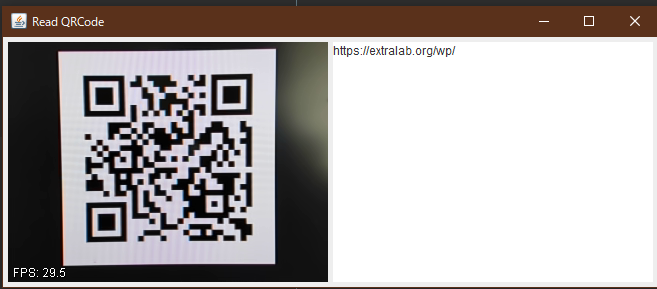
左半分にWebカメラの映像を映して、右半分にQRCodeの内容を表示しています。
今回のQRcodeは、
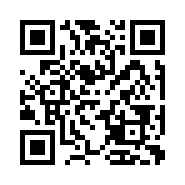 https://extralab.org/wp/
QRCodeをdecodeするにはGoogleの「ZXing」ライブラリを使用します。
Webカメラの映像を表示するライブラリは今回、「Webcam-capture」を使用しました。
ライブラリ
Main.javaのクラスを作成して必要なライブラリを追加するだけです。
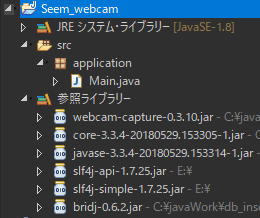
必要なライブラリ
- webcam-capture-0.3.10.jar
- core-3.3.4-20180529.153305-1.jar
- javase-3.8.4-20180529.153314-1.jar
- slf4j-api-1.7.25.jar
- slf4j-simple-1.7.25.jar
- bridj-0.6.2.jar
カメラ映像に必要なのは「Webcam-capture」「slf4j」[「bridj」
ZXingに必要なのは「Core-3.3.4」「javase-3.8.4」
ソースコード
Mainクラスのソースコードを示します。
package application;

import java.awt.FlowLayout;
import java.awt.image.BufferedImage;
import java.util.concurrent.Executor;
import java.util.concurrent.Executors;
import java.util.concurrent.ThreadFactory;

import javax.swing.JFrame;
import javax.swing.JTextArea;

import com.github.sarxos.webcam.Webcam;
import com.github.sarxos.webcam.WebcamPanel;
import com.github.sarxos.webcam.WebcamResolution;
import com.google.zxing.BinaryBitmap;
import com.google.zxing.LuminanceSource;
import com.google.zxing.MultiFormatReader;
import com.google.zxing.NotFoundException;
import com.google.zxing.Result;
import com.google.zxing.client.j2se.BufferedImageLuminanceSource;
import com.google.zxing.common.HybridBinarizer;


public class Main extends JFrame implements Runnable, ThreadFactory{


	private Executor executor = Executors.newSingleThreadExecutor(this);

	private Webcam webcam = null;
	private WebcamPanel panel = null;
	private JTextArea textarea = null;

	public Main() {
		super();

		setLayout(new FlowLayout());
		setTitle("Read QRCode"); //アプリのタイトル
		setDefaultCloseOperation(JFrame.EXIT_ON_CLOSE);

		java.awt.Dimension size = WebcamResolution.QVGA.getSize();

		//Webカメラ選択 index[0]のWebカメラ選択
		webcam = Webcam.getWebcams().get(0);
		webcam.setViewSize(size);

		panel = new WebcamPanel(webcam);
		panel.setPreferredSize(size);
		panel.setFPSDisplayed(true);

		//QRコード結果表示テキストエリア
		textarea = new JTextArea();
		textarea.setEditable(false);
		textarea.setPreferredSize(size);

		//コンテナ追加
		add(panel);
		add(textarea);

		//windowsサイズ変更
		pack();

		//画面表示
		setVisible(true);

		executor.execute(this);
	}

	@Override
	public void run() {

		//ループ処理
		do {
			try {
				Thread.sleep(100);
			} catch (InterruptedException e) {
				e.printStackTrace();
			}

			Result result = null;  //QRcode結果格納
			BufferedImage image = null;  //イメージ格納

			//QRコード読取
			if (webcam.isOpen()) {

				//映像のイメージを取得
				if ((image = webcam.getImage()) == null) {
					continue;
				}

				//ビットマップ作成
				LuminanceSource source = new BufferedImageLuminanceSource(image);
				BinaryBitmap bitmap = new BinaryBitmap(new HybridBinarizer(source));

				//QRコードをデコードしてデータ取得
				try {
					result = new MultiFormatReader().decode(bitmap);
				} catch (NotFoundException e) {
					// fall thru, it means there is no QR code in image
				}
			}

			//データがある場合
			if (result != null) {
				//テキストエリアに表示させる
				textarea.setText(result.getText());
			}


		} while (true);
	}


	@Override
	public Thread newThread(Runnable r) {
		Thread t = new Thread(r, "example-runner");
		t.setDaemon(true);
		return t;
	}

	public static void main(String[] args) {

		new Main();
	}

}
以外に簡単に実現できることがわかりました。
これを基に、もうちょっと応用したアプリを作成していこうと思います。
まとめ
今回はJavaでQRCodeのスキャン方法をご紹介しました。
C#でもQRCodeをスキャンできるので、自分が学び値作りたいアプリケーションに応じて使い分けてみてはいかがでしょうか。
仕事で業務の効率アップする為に今回JavaでQR読取できないかを調べ、実現できました。








最近のコメント