【PLC】キーエンスKV-7500の上位リンク通信でPCとPLCの通信を確立してデータを読み書きする方法
PLCとは
PLCは、工場などの設備ライン、セルラインなんかの制御に使われる機器です。いわゆる「シーケンス制御」を行うコントローラーです。
シーケンサーと、職場では良く言われたりしています。シーケンサーとは、三菱製のPLC製品の名前からきているものが一般的に広まったみたいです。
シーケンス回路は、ラダー図で作成します。上から下に順番に信号が流れるような回路図です。
PLCの回路プログラム作成は、本職ではないので、これくらいの説明でやめます。
では、本題のほうに入りたいと思います。
PLCとPC間のデータ連携図
今回は、仕事でPLC(プログラマブルロジックコントローラ)とPC(パソコン)でデータの読み書きできるアプリを作ることになりました。
そこで、アプリの仕様を備忘録として書いていきます。PC側は、C#.NET WindowsFormでアプリを作り、PLCと通信して、データを読み書きするアプリを作りました。
スイッチングハブを介していますが、1台での通信の場合、そのままPLC⇔PCでのLAN接続で可能です。
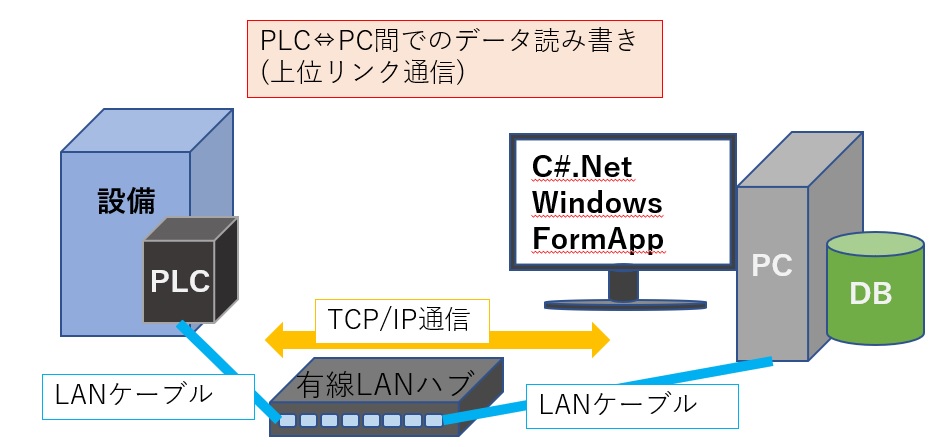
PCとPLCの接続図
上のイメージでは、PLC1台に対して通信をしているが、PLCが複数台ある場合でも、まとめて通信することが可能です。
次で説明↓↓
PLCとPC間のデータ連携図(複数台のPLC可)
そのイメージはこちら↓ LANスイッチングハブを仲介させることで、LANポート分のPLCを接続できます。
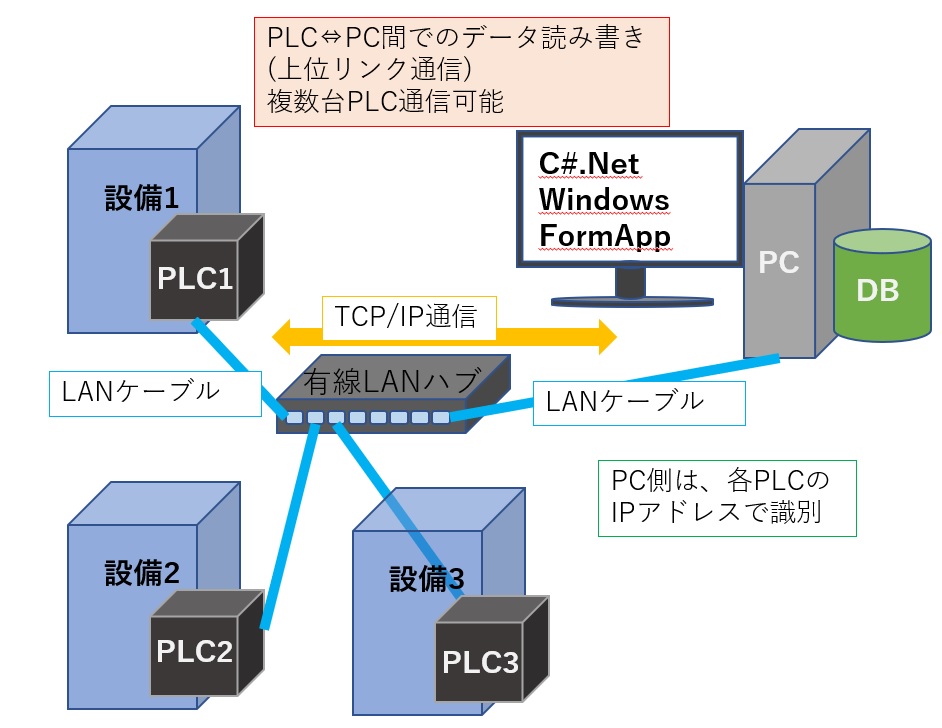
複数台のPLCと接続するイメージ図
設備ラインがいくつもあり、PLCが何台もある場合、データはPC1台で集約したい場合でもPLCの機能によりますが、複数台のPLCをスイッチングハブで繋げてあげれば、可能になります。
PLC側の通信方法
PLC側では、PCとの通信に対しては、何もする必要はありません。自動で応答してくれるような仕様になっています。(キーエンス製の上位リンク通信の場合)
PC側の通信方法
C#.Net WindowsFormのアプリケーションを作成します。
まずは、画面デザインですが、下記の図のようにしています。
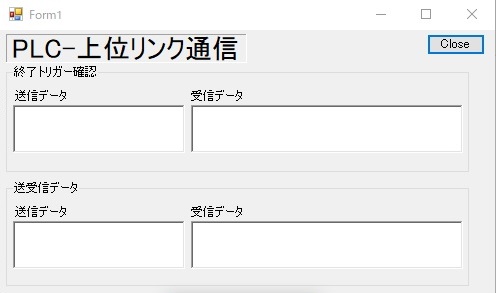
RichTextBoxを4つ配置します。
終了トリガー確認の枠はgroupBoxで囲みます。
この枠の受信データに表示するデバイス値はPLC側の処理の完了トリガーを確認しています。
- 「5」の場合⇒PLC側の処理がまだ完了していない状態
- ループで確認処理が流れる
- 「1」の場合⇒PLC側の処理が完了した状態
- 処理結果の確認処理に移行する
送受信データ枠もgroupBoxで囲みます。
using System;
using System.Collections.Generic;
using System.Data;
using System.Net;
using System.Net.Sockets;
using System.Text;
using System.Windows.Forms;

namespace PLC_Connect
{
    public partial class Form1 : Form
    {
        public Form1()
        {
            InitializeComponent();
        }
        /// <summary>
        /// バックグラウンド処理 Doworkループtrue/false
        /// </summary>
        bool resultbool = true;

        /// <summary>
        /// 上位リンク通信設定値
        /// </summary>
        ///
        public int portNo = 8501;  //上位リンク通信用ポート番号
        public IPAddress iPAddress = IPAddress.Parse("135.15.79.20");   //PLCのIPアドレス

        /// <summary>
        /// データデバイス値設定   上位リンク通信で使用できるデバイス値を設定
        /// </summary>
        //RD⇒読み出し RDS⇒連続読み出し
        //WR⇒書込み WRS⇒連続書込み
        //public string strReadComm = "RDS DM10014.D 2\r";      //2データ読み出しコマンド
        public string strReadComm = "RDS DM61000.D 5\r";        //DM61000  戻り値→list[0]  DM61002 →list[1] DM61004 →list[2] DM61006 →list[3] DM61008 →list[4]
        private string strStartValueComm = "WR DM61010.D 2\r";  //処理完了した合図の数値をPLCに送る
        private string strTriggerComm = "RD DM61010.D\r";       //トリガー 検査終了時
        private string strEndValueComm = "WR DM61010.D 5\r";    //処理完了した合図の数値をPLCに送る


        private int byteValue = 60;                             //受信用の配列バイト容量 適当

        private string startValue = "2";                        //実行中表示


        /// <summary>
        /// 画面起動時処理
        /// </summary>
        /// <param name="sender"></param>
        /// <param name="e"></param>
        private void Form1_Load(object sender, EventArgs e)
        {
            //バックグランド処理実行
            backgroundWorker1.RunWorkerAsync();    //処理完了の確認⇒蓄積処理
        }

        /// <summary>
        /// PCクライアントで検査完了確認して、処理の実行可能不可能分岐
        /// </summary>
        /// <param name="sender"></param>
        /// <param name="e"></param>
        private void BackgroundWorker1_DoWork(object sender, System.ComponentModel.DoWorkEventArgs e)
        {
            List<String> listResult = new List<string>();
            //無限ループ  結果が1の場合完了
            while (resultbool == true)
            {
                System.Threading.Thread.Sleep(500);

                //PLCの処理が終了したか判断のデバイスを読込み
                listResult = AngelEndInfo();

                //バックグラウンド処理1 プログレス更新時
                backgroundWorker1.ReportProgress(0, listResult);

                e.Result = listResult;
            }
            //バックグラウンド処理終了後イベントに続く
        }

        /// <summary>
        /// PLCの処理が終了したか確認する
        /// </summary>
        private List<string> AngelEndInfo()
        {
            //PLCコネクション接続
            TcpClient client2 = new TcpClient();

            //接続確立するまでコンタクトする
            while (!client2.Connected)
            {
                try
                {
                    client2.Connect(iPAddress, portNo);
                }
                catch
                {
                    AutoClosingMessageBox.Show("PLCとの接続確立エラー.", "PLC連携接続エラー", 10000);   //10秒間隔で再コネクトする
                }

            }


            //NetworkStreamを取得

            NetworkStream ns = client2.GetStream();


            //読み取り、書き込みのタイムアウトを10秒にする
            //デフォルトはInfiniteで、タイムアウトしない
            ns.ReadTimeout = 10000;
            ns.WriteTimeout = 10000;

            //読み出しコマンド
            char[] chArray2 = strTriggerComm.ToCharArray();
            byte[] bArray_send = new byte[chArray2.Length];

            //データをバイト配列に変換
            for (int iCount = 0; iCount < chArray2.Length; iCount++)
            {
                bArray_send[iCount] = Convert.ToByte(chArray2[iCount] & 0xFFFF);
            }

            ///////コマンド送信  処理終了確認用コマンド/////////
            ns.Write(bArray_send, 0, bArray_send.Length);

            //S-JISに変換
            String sendData2 = Encoding.GetEncoding(932).GetString(bArray_send);

            sendData2 = String.Format("{0}", sendData2);

            byte[] bArray_receive2 = new byte[byteValue];

            //////データ受信//////
            ns.Read(bArray_receive2, 0, bArray_receive2.Length);

            //S-JISに変換
            String receiveData2 = Encoding.GetEncoding(932).GetString(bArray_receive2);

            receiveData2 = String.Format("{0}", receiveData2).Substring(9, 1);


            //通信クローズ
            ns.Close();
            ns.Dispose();

            client2.Close();
            client2.Dispose();

            List<string> stArrayData = new List<string>();
            stArrayData.Add(sendData2);
            stArrayData.Add(receiveData2);

            //if (receiveData2 == "1")
            //{
            //    List<String> receiveListData = DatainputDo();  ///データ蓄積処理実行
            //    stArrayData.Add(receiveListData[0]);
            //    stArrayData.Add(receiveListData[1]);

            //}

            return stArrayData;
        }


        /// <summary>
        /// バックグラウンド処理実行 プログレス処理
        /// </summary>
        /// <param name="sender"></param>
        /// <param name="e"></param>
        private void BackgroundWorker1_ProgressChanged(object sender, System.ComponentModel.ProgressChangedEventArgs e)
        {

            List<String> listResult = (List<String>)e.UserState;

            //検査完了確認用送信コマンドを表示
            angleEndCheckBox.Text = listResult[0];

            //検査確認結果受信データを表示
            angleEndResultBox.Text = listResult[1];


            resultbool = false; //ループから抜け出してバックグラウンド処理完了イベントを発生させる

        }

        /// <summary>
        /// 取得
        /// </summary>
        /// <returns></returns>
        private List<String> Sendcomm()
        {
            //PLCコネクション接続
            System.Net.Sockets.TcpClient client = new System.Net.Sockets.TcpClient();

            //接続確立するまでコンタクトする
            while (!client.Connected)
            {
                try
                {
                    client.Connect(iPAddress, portNo);
                }
                catch
                {
                    AutoClosingMessageBox.Show("PLCとの接続確立エラー.", "PLC連携接続エラー", 10000);   //10秒間隔でコネクトする
                }

            }

            //NetworkStreamを取得
            NetworkStream ns = client.GetStream();

            //読み取り、書き込みのタイムアウトを10秒にする
            //デフォルトはInfiniteで、タイムアウトしない
            ns.ReadTimeout = 10000;
            ns.WriteTimeout = 10000;

            //読み出しコマンド
            //string strReadComm = "RD DM10014.U\r";
            //string strReadComm = "RDS DM10014.U 2\r";

            char[] chArray2 = strReadComm.ToCharArray();
            byte[] bArray_send = new byte[chArray2.Length];

            //データをバイト配列に変換
            for (int iCount = 0; iCount < chArray2.Length; iCount++)
            {
                bArray_send[iCount] = Convert.ToByte(chArray2[iCount] & 0xFFFF);
            }

            //コマンド送信
            ns.Write(bArray_send, 0, bArray_send.Length);

            //S-JISに変換
            String sendData2 = Encoding.GetEncoding(932).GetString(bArray_send);

            //送信コマンドを表示
            sendData2 = String.Format("{0}", sendData2);

            byte[] bArray_receive2 = new byte[byteValue];

            //データ受信
            ns.Read(bArray_receive2, 0, bArray_receive2.Length);

            //S-JISに変換
            String receiveData2 = Encoding.GetEncoding(932).GetString(bArray_receive2);

            //通信クローズ
            ns.Close();

            ns.Dispose();
            client.Close();
            client.Dispose();

            //受信データを表示
            receiveData2 = String.Format("{0}", receiveData2);

            List<String> list = new List<string>();
            list.Add(sendData2);
            list.Add(receiveData2);

            return list;
        }

        /// <summary>
        /// バックグラウンド処理が完了後の処理
        /// </summary>
        /// <param name="sender"></param>
        /// <param name="e"></param>
        private void BackgroundWorker1_RunWorkerCompleted(object sender, System.ComponentModel.RunWorkerCompletedEventArgs e)
        {

            List<String> listResult = (List<String>)e.Result;

            // データ呼び出し
            List<String> receiveData = Sendcomm();

            // スペース区切りで分割して配列に格納する
            string[] separator = new string[] { " ", "\r\n" };
            string[] strArrayData = receiveData[1].Split(separator, StringSplitOptions.RemoveEmptyEntries);

            //完了した場合
            if (listResult[1] == "1")
            {
                //実行中 表示
                StartComm();

                //データ取得用送信コマンド表示
                send_Command_Box.Text = receiveData[0];

                //データ取得結果用受信データ表示
                receive_Command_Box.Text = receiveData[1];

                ///処理終了したので、終了値PLCに書込み
                PlcforEndValue();
            }

            resultbool = true;  //処理が終わったので、ループ処理再開

            //バックグランド処理実行
            backgroundWorker1.RunWorkerAsync();    //確認⇒ ループ処理

        }


        /// <summary>
        /// 処理終了の合図 数値をPLCに書込み
        /// </summary>
        private void PlcforEndValue()
        {
            //PLCコネクション接続
            TcpClient client = new TcpClient();

            //接続確立するまでコンタクトする
            while (!client.Connected)
            {
                try
                {
                    client.Connect(iPAddress, portNo);
                }
                catch
                {
                    AutoClosingMessageBox.Show("PLCとの接続確立エラー", "PLC連携接続エラー", 10000);   //10秒間隔でコネクトする
                }

            }

            //NetworkStreamを取得
            NetworkStream ns = client.GetStream();

            //読み取り、書き込みのタイムアウトを10秒にする
            //デフォルトはInfiniteで、タイムアウトしない
            ns.ReadTimeout = 10000;
            ns.WriteTimeout = 10000;

            //読み出しコマンド
            char[] chArray2 = strEndValueComm.ToCharArray();
            byte[] bArray_send = new byte[chArray2.Length];

            //データをバイト配列に変換
            for (int iCount = 0; iCount < chArray2.Length; iCount++)
            {
                bArray_send[iCount] = Convert.ToByte(chArray2[iCount] & 0xFFFF);
            }

            ///////コマンド送信  確認用コマンド/////////
            ns.Write(bArray_send, 0, bArray_send.Length);

            //通信クローズ
            ns.Close();
            ns.Dispose();

            client.Close();
            client.Dispose();

        }


        /// <summary>
        /// 処理開始の合図信号の書込み処理
        /// </summary>
        private void StartComm()
        {
            //PLCコネクション接続
            System.Net.Sockets.TcpClient client = new System.Net.Sockets.TcpClient();
            //接続確立するまでコンタクトする
            while (!client.Connected)
            {
                try
                {
                    client.Connect(iPAddress, portNo);
                }
                catch
                {
                    AutoClosingMessageBox.Show("PLCとの接続確立エラー.", "PLC連携接続エラー", 10000);   //10秒間隔でコネクトする
                }

            }

            //NetworkStreamを取得
            NetworkStream ns = client.GetStream();

            //読み取り、書き込みのタイムアウトを10秒にする
            ns.ReadTimeout = 10000;
            ns.WriteTimeout = 10000;

            char[] chArray2 = strStartValueComm.ToCharArray();  // 実行中の表示⇒ デバイス値に→2を書込む
            byte[] bArray_send = new byte[chArray2.Length];

            //データをバイト配列に変換
            for (int iCount = 0; iCount < chArray2.Length; iCount++)
            {
                bArray_send[iCount] = Convert.ToByte(chArray2[iCount] & 0xFFFF);
            }

            //コマンド送信
            ns.Write(bArray_send, 0, bArray_send.Length);

            //S-JISに変換
            String sendData2 = Encoding.GetEncoding(932).GetString(bArray_send);

            //送信コマンドを表示
            sendData2 = String.Format("{0}", sendData2);

            //通信クローズ
            ns.Close();
            ns.Dispose();

            client.Close();
            client.Dispose();

            //受信データを表示
            //receiveData2 = String.Format("{0}", receiveData2);

            List<String> list = new List<string>();
            list.Add(sendData2);
            //list.Add(receiveData2);

            angleEndCheckBox.Text = list[0];
            angleEndResultBox.Text = startValue;  //実行中表示

        }


        /// <summary>
        /// メッセージダイアログのタイムアウトで自動で閉じる処理
        /// </summary>
        public class AutoClosingMessageBox
        {
            int text_max_length = 200; //最大の文字列長の指定
            System.Threading.Timer _timeoutTimer;
            string _caption;
            AutoClosingMessageBox(string text, string caption, int timeout)
            {
                if (text.Length > text_max_length) //内容の長さを制限する追加部分
                {
                    text = text.Substring(0, text_max_length);
                }
                //text = ( text.length > text_max_length ) ? text.Substring( 0, text_max_length ) : text; //三項目演算での記述方法 ? の左側が true の時 : の左側が代入されます。 falseの時は右側
                _caption = caption;
                _timeoutTimer = new System.Threading.Timer(OnTimerElapsed, null, timeout, System.Threading.Timeout.Infinite);
                MessageBox.Show(text, caption);
            }
            public static void Show(string text, string caption, int timeout)
            {
                new AutoClosingMessageBox(text, caption, timeout);
            }
            void OnTimerElapsed(object state)
            {
                IntPtr mbWnd = FindWindow(null, _caption);
                if (mbWnd != IntPtr.Zero)
                {
                    SendMessage(mbWnd, WM_CLOSE, IntPtr.Zero, IntPtr.Zero);
                }
                _timeoutTimer.Dispose();
            }
            const int WM_CLOSE = 0x0010;
            [System.Runtime.InteropServices.DllImport("user32.dll", SetLastError = true)]
            static extern IntPtr FindWindow(string lpClassName, string lpWindowName);
            [System.Runtime.InteropServices.DllImport("user32.dll", CharSet = System.Runtime.InteropServices.CharSet.Auto)]
            static extern IntPtr SendMessage(IntPtr hWnd, UInt32 Msg, IntPtr wParam, IntPtr lParam);
        }


        /// <summary>
        /// クローズボタン押下処理
        /// </summary>
        /// <param name="sender"></param>
        /// <param name="e"></param>
        private void dataStorageStopButton_Click(object sender, EventArgs e)
        {
            ActiveForm.Close();
        }
    }
}
その他の活用方法として、PLCとPC間の連携するメリット
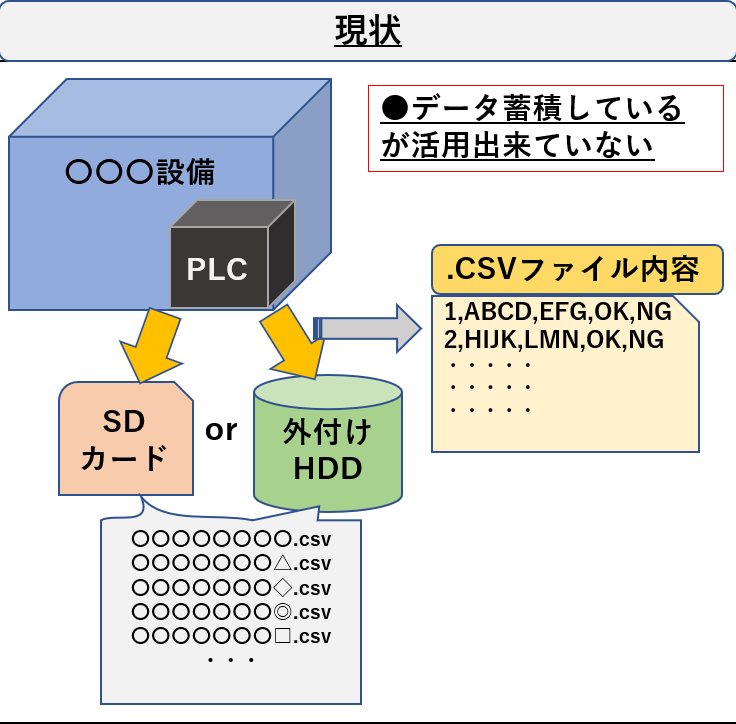
工場内の設備で使用しているPLC[programmable logic controller](プログラマブルコントローラー)ですが、いままでは、その設備内でデータ蓄積していた(下記図参照)ので、データを活用できていないケースがまだまだ現場サイドだと課題になっております。そのデータをPC側で管理してデータベースに蓄積し、トレーサビリティの活用、生産稼働率の見える化の活用などに応用できます!